Articles / Records, patients, and staff
Staff Access, Offboarding, and Snooping: HIPAA Rules for a Dental Practice (2026)
Two things decide whether your practice controls its patient records: who you let see them, and how fast you take that access away. HIPAA does not ask you to lock the front desk out of the schedule, but it does ask you to give each person only the access their job needs, to be able to tell when someone opens a record they had no business opening, and to cut off a departing employee before they walk out the door. Get those right and an insider problem stays small. Get them wrong and a single login you forgot to turn off becomes an enforcement file. Here is what HIPAA actually requires, and what to do about it. Access control is one layer; for the full layout, start with HIPAA compliance for a dental practice.
This article explains how HIPAA governs which staff members may see patient records at a dental practice, and what to do when one of them leaves. It is general information, not legal advice for your specific situation. For that, consult a healthcare attorney or a qualified HIPAA compliance professional.
Who should be able to see what
Workforce access under HIPAA starts with one idea: minimum necessary. The Privacy Rule's minimum necessary standard says that when your staff use patient information, you have to make a reasonable effort to limit it to what the task actually requires. The companion rule, 45 CFR 164.514(d), is more concrete for an employer: you have to identify which people, or which roles, need access to patient information to do their jobs, and which categories of information each role needs. In plain terms, that is role-based access. The scheduler at the front desk needs the appointment book and contact details. The hygienist needs the clinical chart. The biller needs treatment and insurance information. None of them needs unrestricted access to everything, and HIPAA expects your setup to reflect that.
Many practice management and imaging systems can do this through permission levels or user roles, so the work is usually a matter of setting each account up correctly rather than buying anything new. The setup to avoid is the all-or-nothing account, where every login can see and change everything, because the day something goes wrong you have no way to contain it and no way to show OCR that access was ever limited.
Role-based access only works if you can tell people apart, which is why unique user identification is a required part of the Security Rule, not an optional one. Every person who works with the electronic patient records needs their own login. The shared "frontdesk" account that several people use looks convenient, but it fails a required standard and it erases accountability: if a record is opened improperly, a shared account cannot tell you who opened it. Proving identity at that login, with a password or multi-factor authentication, is a separate question with its own guide. The point here is simpler: each person has to be distinguishable.
Would you know if someone looked at a record they had no reason to see?
This is where many practices have a quiet gap. The Security Rule requires audit controls, meaning your systems have to record and examine activity so there is a trail of who accessed what. It separately requires an information system activity review, meaning you have to actually review those records on a regular basis, including access reports and audit logs. Both are required, and the difference between them is where offices slip: having logging turned on is not the same as reviewing it. Dental software typically keeps an audit log. Far fewer practices ever open it. A log nobody reads cannot tell you that a staff member pulled up the chart of a neighbor, an ex, or a local celebrity who is not their patient, and it cannot show an investigator that you were watching.
The cost of that gap shows up in enforcement. In a 2024 settlement, the Office for Civil Rights found that a New York medical center had an employee who stole the records of 12,517 patients and sold them to an identity theft ring, and that the theft went undetected until the New York Police Department alerted the center two years later. OCR did not penalize the center because an employee went rogue. It penalized the center for missing the safeguards that would have caught it: no accurate risk analysis, no monitoring of system activity, no mechanism to record and examine who was doing what. The center paid $4.75 million.
Detection comes with a matching duty. The Security Rule requires a sanction policy, a written set of consequences you apply to a workforce member who breaks the rules. Catching a snoop and doing nothing is its own failure.
What HIPAA requires for staff access, at a glance
The Security Rule sorts its safeguards into two kinds, and the difference matters here. Some are required and some are addressable. Required means you implement it. Addressable does not mean optional: you assess whether it fits your practice, then either implement it or document why not and put an equivalent measure in its place where that is reasonable. For a small office that flexibility is built in on purpose, because the rule tells you to weigh your size, complexity, and capabilities when you decide how to meet a standard. It is why a two-person practice and a hospital can both comply without doing identical things. What it never means is skipping the question.
| Control | Status | What it means for a dental office |
|---|---|---|
| Each person has their own login (unique user ID) | Required | No shared front-desk accounts. You must be able to tell who did what. |
| Record and review system activity (audit controls plus activity review) | Required | Keep audit logs, and actually read them on a set schedule. |
| A sanction policy for misuse | Required | Written consequences when someone breaks the rules. |
| Limit each role to the minimum it needs (minimum necessary) | Required (Privacy Rule) | Set permissions by role. No all-access accounts. |
| Authorize, establish, and modify who has access | Addressable | Have a process for granting and changing access, and document it. |
| Terminate access when someone leaves | Addressable | Turn off the login at separation. Addressable does not mean optional. |
| Automatic logoff after inactivity | Addressable | Screens lock themselves, so an unattended workstation is not open access. |
What a snooping employee actually risks
It helps to separate two kinds of exposure, because they fall on two different people. Your practice, as the covered entity, answers to OCR if it failed to put the controls in place. That is the civil track, and it is what the settlements above are about. The employee who actually misused the access answers to a different authority. Knowingly obtaining or disclosing someone's health information without authorization is a federal crime under 42 USC 1320d-6, and it reaches an individual employee, not just the practice. The base level carries a fine of up to $50,000 and up to a year in prison. If the person acted under false pretenses, it rises to a fine of up to $100,000 and up to five years, and if they did it to sell the data or for personal gain, it rises to a fine of up to $250,000 and up to ten years. The Justice Department, which prosecutes these cases, has taken the position that "knowingly" only means the person knew what they were doing, not that they knew it broke HIPAA.
Prosecutors do bring these cases, and dental practices are not exempt. The Manhattan District Attorney's Office announced in 2018 that a former receptionist at a Manhattan dental practice had been convicted by a jury, on 189 counts, of stealing the personal information of 653 patients from the office where she worked and sharing it with an accomplice who used it to obtain credit in the patients' names. She was sentenced to two to six years in state prison. The charges were state identity-theft and larceny crimes rather than a HIPAA count, which is a common pattern: the federal HIPAA crime and a state's own theft laws are two separate tracks, and an insider can be exposed to either. For a practice, the lesson is not that every insider crime is preventable. It is that real, authorized job access still needs limits and a review of how it is used.
The most dangerous moment is the day someone leaves
Everything above gets tested at separation, and especially at a firing, which is one of the highest-risk moments a practice has. An employee who left on bad terms and still has a working login is the exact scenario HIPAA's termination procedures are meant to prevent. That specification is technically addressable, but as we covered, addressable does not mean optional, and the controls that make a clean exit possible, the unique login and the activity review, are required. The practical rule is simple: when someone's employment or contract ends, their access ends the same day.
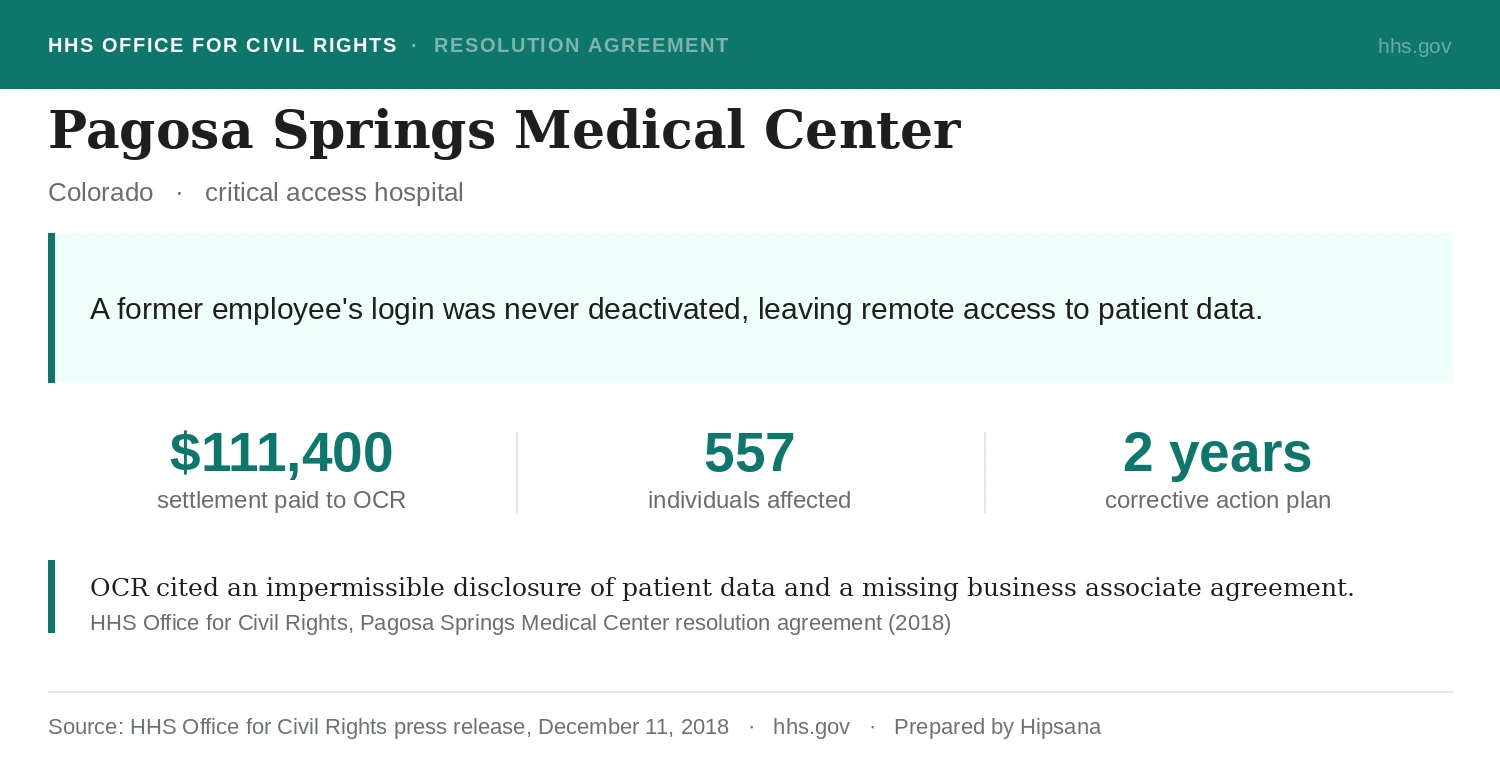
A Colorado hospital learned what the gap costs. The Office for Civil Rights found that Pagosa Springs Medical Center had failed to deactivate a former employee's username and password after the employment ended, and that the former employee kept remote access to the hospital's web-based scheduling calendar, which held patient information. The hospital ended up disclosing the protected health information of 557 individuals, both to the former employee and to the calendar's vendor, which it had never put under a business associate agreement. Pagosa Springs paid $111,400 and accepted a two-year corrective action plan. The director of OCR put the lesson in one line: former employees should immediately lose access to patient information when they leave.
The fix is a short, repeatable offboarding routine you run every time someone leaves. None of it requires special tools.
Turn off the user account in every system that holds patient data: your practice management software, imaging, email, and any cloud or backup service. Do it on their last day, not at the end of the week.
If staff shared a password for a device, a Wi-Fi network, or a vendor portal, change it. A former employee who still knows a working password still has a way in.
Recover physical keys, badges, alarm codes, and any laptop or phone that can reach patient data, and remove their access to the building and the alarm system.
If they could log in from home through a portal, a VPN, or a remote-desktop tool, disable that too. The Colorado settlement turned on remote access that was never switched off.
If the employee had their own account with your IT company, billing service, or a cloud vendor, notify the vendor to close it.
Look at their access logs from their final weeks for anything unusual, and keep a short dated record of the offboarding steps you completed. If you are ever asked, that record is your proof.
If you want a quick read on whether the foundation under all of this is in place, the free HIPAA Scorecard checks ten core Security Rule controls that line up with the issues OCR raises most, including whether everyone has their own login instead of a shared account, whether your devices lock themselves, and whether you have done a risk analysis, then names your biggest gap in about three minutes. It does not check your offboarding routine or your audit-log review, but it shows whether the broader HIPAA foundation is in place.
Where this is heading: the proposed 2026 rule
The flexibility in the current rule may not last. In January 2025 the federal government published a proposed overhaul of the Security Rule that would end the addressable category and make these controls explicit. For offboarding, it would require shutting off a departing worker's access within one hour of the employment ending, and notifying any other organization that shared access with that worker within 24 hours. It also names role-based access control directly as the expected model. The proposal is not law: the comment period closed in March 2025, its target finalization date passed with nothing published, and more than 100 health care organizations have asked for it to be withdrawn. The full picture of what the 2026 rule would change is its own subject. The reason to mention it here is direction. Even before any of it is final, "turn off access the day they leave" is the safe operating assumption, and the proposal would only tighten the clock.
This is general information about HIPAA and a proposed federal rule, not legal advice, and the rule's status can change. Before you rely on any access or offboarding setup to meet HIPAA, have it reviewed by a healthcare attorney or a qualified HIPAA compliance professional.
About the author
Dolev Arama is Hipsana's founder. He's the one behind the Scorecard and the short risk reviews it produces. He is not an attorney, and Hipsana is a publisher and referral service, not a law firm or a healthcare provider. The writing here starts where the rules actually live (HHS, OCR, NIST) and gets checked against their current text before it goes up. Regulatory claims trace back to those sources, and figures name where they come from; anything that can't be verified is labeled rather than asserted. More about Hipsana →
Sources
- 45 CFR § 164.502(b) (minimum necessary standard) and § 164.514(d)(2) (identify which workforce members or roles need access to protected health information to carry out their duties, i.e., role-based access) (eCFR, current as of July 2026).
- 45 CFR § 164.312(a)(2)(i) (unique user identification, Required), § 164.312(a)(2)(iii) (automatic logoff, Addressable), § 164.312(b) (audit controls, a required standard), and § 164.312(d) (person or entity authentication) (eCFR, current as of July 2026).
- 45 CFR § 164.308(a)(1)(ii)(C) (sanction policy, Required), § 164.308(a)(1)(ii)(D) (information system activity review, Required), § 164.308(a)(3)(ii)(C) (termination procedures, Addressable), and § 164.308(a)(4)(ii)(B)–(C) (access authorization and access establishment and modification, Addressable) (eCFR, current as of July 2026).
- 45 CFR § 164.530(e) (Privacy Rule sanctions: a covered entity must apply appropriate sanctions against workforce members who violate its privacy policies or the Privacy Rule) and § 164.530(f) (mitigation of harm from an improper use or disclosure) (eCFR, current as of July 2026).
- 45 CFR § 164.306(d) (the “required” versus “addressable” framework), § 164.306(b)(2) (security measures take into account a regulated entity’s size, complexity, and capabilities), and § 164.316 (documentation, retained for six years) (eCFR, current).
- 42 U.S.C. § 1320d-6 (wrongful disclosure of individually identifiable health information): up to $50,000 and one year; up to $100,000 and five years under false pretenses; up to $250,000 and ten years for personal gain or malicious harm (uscode.house.gov, current).
- U.S. Department of Justice, Office of Legal Counsel, “Scope of Criminal Enforcement Under 42 U.S.C. § 1320d-6” (justice.gov): an individual can be prosecuted directly, and “knowingly” requires only knowledge of the facts that constitute the offense, not knowledge that the act violates HIPAA.
- U.S. Department of Health and Human Services, Office for Civil Rights, settlement with Pagosa Springs Medical Center (hhs.gov, December 2018): a Colorado critical access hospital failed to deactivate a former employee’s username and password after termination; the former employee retained remote access to a web-based scheduling calendar containing ePHI; OCR found an impermissible disclosure of the ePHI of 557 individuals, including to the calendar vendor without a business associate agreement; the hospital paid $111,400 with a two-year corrective action plan.
- U.S. Department of Health and Human Services, Office for Civil Rights, “Settles Malicious Insider Cybersecurity Investigation for $4.75 Million” (Montefiore Medical Center) (hhs.gov, February 2024): an employee stole the ePHI of 12,517 patients and sold it to an identity theft ring; OCR found failures to conduct a risk analysis, to monitor information system activity, and to implement audit controls that record and examine activity, and that the center could not detect the theft for years.
- Manhattan District Attorney’s Office announcement (April 2018): a former receptionist at a Manhattan dental practice was convicted by a jury on 189 counts and sentenced to two to six years in state prison for stealing the personal information of 653 patients; the convictions were New York State identity-theft and larceny offenses, not a federal HIPAA charge.
- U.S. Department of Health and Human Services, Office for Civil Rights, HIPAA Security Rule notice of proposed rulemaking, 90 FR 898 (Federal Register, Jan. 6, 2025): the proposal would remove the addressable category, require terminating a workforce member’s access within one hour of separation and notifying other regulated entities within 24 hours, and names role-based access control as a model; the HHS NPRM fact sheet summarizes the addressable-category removal and the 24-hour notification; proposed, not finalized as of July 2026.
- American Dental Association, “ADA urges HHS to withdraw proposed HIPAA cybersecurity rule” (ada.org, December 2025): the ADA joined a coalition of more than 100 organizations seeking withdrawal of the proposed rule.
- HHS, Spring 2025 Unified Agenda, RIN 0945-AA22 (reginfo.gov): the HIPAA Security Rule final action carried a projected target of May 2026, which passed with no final rule published as of July 2026.
Frequently asked questions
Can my front-desk staff all share one login?
No. Unique user identification is a required part of the HIPAA Security Rule: every person who handles patient data needs their own login (45 CFR 164.312(a)(2)(i)). A shared front-desk account fails that requirement, and it means that if a record is opened improperly, you cannot tell who did it. A shared computer is fine, but each person should sign in under their own account.
Is an employee allowed to look up a friend's or family member's chart?
Not unless that person is their patient and they have a work reason to be in the record. HIPAA's minimum necessary rule limits staff access to what the job requires (45 CFR 164.502(b)), so pulling up the chart of a friend or a relative out of curiosity is an improper use. Your audit logs are how you catch it, and your sanction policy is how you respond.
We fired someone. How fast do we have to turn off their access?
The safe answer is the same day. The current rule does not name an exact deadline, but the controls behind a clean exit are required, and a recurring enforcement scenario is a former employee whose login was never switched off. The proposed 2026 rule would put a hard limit on it: access terminated within one hour of the employment ending.
Does HIPAA require us to read our audit logs, or just keep them?
Both. The Security Rule requires audit controls that record and examine activity (45 CFR 164.312(b)) and, separately, a regular review of information system activity such as access reports and audit logs (45 CFR 164.308(a)(1)(ii)(D)). Logging that nobody reviews does not meet the second requirement, and it will not catch an insider.
Can a staff member go to jail for snooping?
Yes. Knowingly accessing or disclosing patient information without authorization is a federal crime under 42 U.S.C. 1320d-6, carrying up to a year in prison for the basic offense and up to ten years when it is done to sell the data or for personal gain. That criminal exposure is separate from your practice's civil exposure to OCR for not having the controls in place.
We use one shared computer at the front desk. Is that a problem?
The shared computer is not the problem; the shared account is. As long as each person signs in under their own login and the workstation locks itself after a short period of inactivity, a single physical computer is fine. What HIPAA does not want is several people working under one username, because that erases the trail of who accessed what.
Not sure where your practice stands?
The free HIPAA Scorecard checks ten core Security Rule controls and scores your practice out of 100. About three minutes, no cost. A starting point, not a full audit.
Check my practice →