Articles / Tools you already use
Is Your Dental Practice's Email HIPAA Compliant? (2026)
Probably not the way you are using it. HIPAA does not ban emailing patient information, but it does require you to secure it, and standard Gmail or Microsoft 365 will not encrypt an outgoing message on its own. After a small clinic sent the records of 1,263 patients to an unknown email account, it paid $25,000 to settle with federal regulators. Here is what the rules actually require, what is changing in 2026, and how to close the gap before it is your practice. The same Security Rule logic runs through the broader HIPAA framework a dental practice works within. Texting patients is a separate channel with its own rules, covered in our guide to HIPAA text messaging.
This article explains whether a dental practice's email is HIPAA compliant. It is general information, not legal advice for your specific situation. For that, consult a healthcare attorney or a qualified HIPAA compliance professional.
Does HIPAA actually let a dental practice email patient information?
Yes. The HIPAA Privacy Rule lets a dental practice communicate with patients by email, as long as it applies reasonable safeguards, such as checking the address before hitting send. HHS has said this plainly.
The Security Rule then governs the electronic copy. It does not flatly require encryption. Encryption sits in the rule as an "addressable" specification in two places, one for data at rest on your devices and one for data in transit across the internet.
"Addressable" does not mean optional. It means you either encrypt, or you document why encryption is not reasonable for your practice and put an equivalent safeguard in its place. Two myths waste a lot of time here. A confidentiality line at the bottom of the message does not make an unencrypted email compliant. And a password is not encryption: a password keeps someone out of a file, while encryption scrambles the contents so that intercepting the message reveals nothing.
Your practice's facts can change the answer, so for your specific situation, consult a healthcare attorney or qualified compliance professional.
Is Gmail HIPAA compliant? Is Microsoft 365?
Not in their consumer form. A free @gmail.com or @outlook.com account cannot be made compliant under any setting, because the vendor will not sign a business associate agreement covering it. That agreement, or BAA, is the contract that makes a vendor responsible for the patient data it touches. Without one, sending protected health information through that account is a violation the moment it leaves your outbox.
Paid Google Workspace and Microsoft 365 are different. Both will sign a BAA, and both can be configured to handle patient data. Signing it is step one, not the finish line. The agreement covers the vendor's own systems. It does not cover your staff using a personal account on the side, a plugin or archiver that needs its own agreement, or an auto-forward rule that quietly copies messages somewhere else.
There is also a quieter gap in transit. These services protect mail with TLS, a method that encrypts the connection between two mail servers. It works only when the receiving server also supports it. When it does not, many systems fall back to sending in plain text, and the standard product does not encrypt the message itself on its own. For anything sensitive, you want encryption that travels with the message, not just protection on the link.
Can I email an x-ray to a specialist or lab?
This is where most dental practices are exposed. Panoramic films, CBCT scans, intraoral photos, and the referral note that travels with them are all protected health information. Emailing them to a specialist, a lab, or another office is provider-to-provider communication, and the rules here are stricter than they are for a message to a patient.
| Emailing patient data to... | Consent to fall back on? | Must it be encrypted? |
|---|---|---|
| The patient, for their own records | Yes, after a plain-language warning | No, if the patient asks for plain email |
| A specialist, lab, or another office | No, none is available | Yes, or send through a BAA-covered service |
When you email a patient, you can rely on their consent after a warning. With another provider or a lab, that fallback does not exist, and warning the recipient is not enough. Unless the message is encrypted, or it moves through a service that has signed a BAA with you, that routine email of an x-ray is the exact transmission the Security Rule expects you to protect.
What if a patient asks me to email their own records?
A patient has the right to receive their own records by ordinary, unencrypted email if they ask for it. You give them a brief warning that an unencrypted message could be read in transit, confirm they still want it that way, and then you have to honor the request. HHS has been explicit about this.
Once you have warned them and complied, you are not responsible for breach notification if that message is intercepted on the way to them. The duty that remains is small and practical: enter the address correctly. This exception is narrow. It covers a patient receiving their own information, and never the lab-and-specialist email above.
What does OCR actually go after dental practices for?
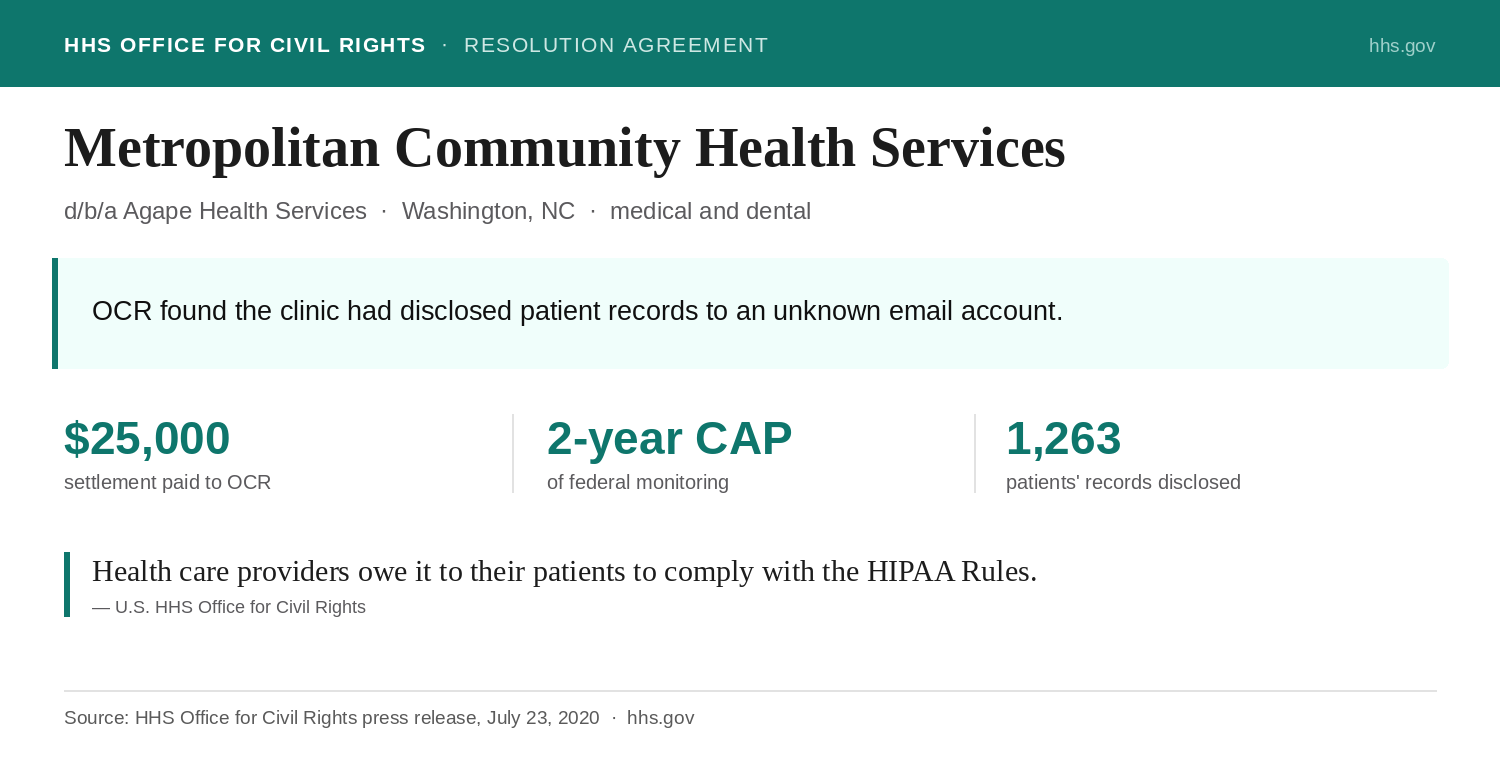
In 2020, a small clinic in rural North Carolina settled with federal regulators over a breach it had first reported in 2011. Metropolitan Community Health Services, which provides medical and dental care to an underserved community as Agape Health Services, had disclosed the protected health information of 1,263 patients to an unknown email account. The Office for Civil Rights investigated, and found the problem was bigger than one message.
The clinic had never completed a risk analysis, had no written security policies, and had not trained its staff on HIPAA until 2016, despite operating since the late 1990s. It agreed to pay $25,000 and accept two years of federal monitoring to settle potential violations of the Security Rule without admitting liability, and OCR noted the clinic's size and mission were taken into account in reaching the figure. The lesson is not the dollar amount. It is that an email mistake opens the door, and the investigation then examines everything behind it.
Metro is one entry in a long pattern. We track the named dental settlements and the failures behind them in our dental HIPAA breach and enforcement report.
You do not have to guess which of these gaps is yours. The free HIPAA Scorecard checks your email and vendor coverage along with eight other core controls and names your biggest gap in about three minutes. It is a starting point, not a full audit, but it tells you where you stand.
Encryption and the breach safe harbor
Encryption does more than reduce risk. It can keep an accident from becoming a reportable breach at all. The Breach Notification Rule applies only to "unsecured" patient information. If a message was encrypted to the federal standard that HHS specifies, which points to encryption methods tested by NIST, then a message that goes to the wrong place is generally not a breach you have to report. Send the same records unencrypted and a single wrong address can become a 60-day notification clock and an OCR investigation.
There is one condition that is easy to miss. The safe harbor holds only if the decryption key was not exposed along with the data. If an intruder takes both the encrypted message and the key that unlocks it, or the encryption did not meet the standard, the safe harbor does not apply and you are back to reporting. Keep keys and passwords separate from the data they protect.
What is changing under the proposed 2026 rule?
You have probably seen headlines that HIPAA now requires encryption. It does not, yet. A proposed overhaul of the Security Rule was published in the Federal Register on January 6, 2025. It would remove much of the "addressable" flexibility and make encryption mandatory at rest and in transit. As of mid-2026 it is still a proposal: the comment period closed in March 2025, the target date for a final rule passed with nothing published, and a coalition of industry groups has asked HHS to withdraw it. It could be finalized, changed, delayed, or dropped.
The practical answer does not wait on the outcome. The current rule already expects you to assess transmission security and to either encrypt or document why not, and OCR already takes action when patient email goes wrong. Whatever happens to the proposal, the email safeguards below are what a current risk analysis points to.
How to make your dental practice's email HIPAA compliant
There is no single "HIPAA email" switch. You are choosing how patient information moves, and most practices end up combining a couple of the options below.
| Option | What it is | Best for | The catch |
|---|---|---|---|
| Enforced TLS (Workspace or 365 + BAA) | Encrypts the connection between mail servers | Routine mail to providers whose servers also support it | Mail bounces when the other server cannot use TLS, and you set it per partner domain |
| Encrypted email or portal pickup | Encrypts the message itself, or delivers it through a secure link | Sending records to any recipient, inside or outside healthcare | The recipient may have to open a portal or verify identity |
| Secure patient portal | Patient data stays off email entirely | Detailed clinical records and patient access requests | The patient has to log in |
| Keep PHI out of the message | Send only logistics, with no patient detail | Appointment reminders and scheduling | Hard to enforce, and the address itself can be patient information |
Referrals to specialists, x-rays to labs, claims, and any message a patient asked for. That same list belongs in your risk analysis.
Move off any consumer @gmail.com or @outlook.com account. On Google Workspace or Microsoft 365, sign the business associate agreement in the admin console.
Enforce TLS, then add message-level encryption or a secure portal for anything sensitive, so the contents are protected even when the receiving server is not.
One page: no patient data from personal accounts, nothing sensitive in a subject line, and exactly how to send securely. Then document that the training happened.
If you rely on something other than encryption anywhere, write down why it is reasonable. That documentation is what an addressable specification requires.
None of this is expensive. A compliant email plan with encryption usually runs a few dollars per mailbox a month, often bundled into a practice-management platform or your IT provider's fee. The costly version is the one Metro paid, after the fact.
This is general information about HIPAA and email, not legal advice. Your own risk analysis, and any stricter rules in your state, decide what is reasonable for your specific practice.
About the author
Dolev Arama is Hipsana's founder. He's the one behind the Scorecard and the short risk reviews it produces. He is not an attorney, and Hipsana is a publisher and referral service, not a law firm or a healthcare provider. The writing here starts where the rules actually live (HHS, OCR, NIST) and gets checked against their current text before it goes up. Regulatory claims trace back to those sources, and figures name where they come from; anything that can't be verified is labeled rather than asserted. More about Hipsana →
Sources
- HHS Office for Civil Rights, Resolution Agreement and Corrective Action Plan, Metropolitan Community Health Services (doing business as Agape Health Services) (July 23, 2020).
- HHS Office for Civil Rights, FAQ 570, “Does HIPAA permit health care providers to use email to discuss health issues with patients?” (accessed June 2026).
- HHS Office for Civil Rights, guidance on rendering unsecured protected health information unusable, unreadable, or indecipherable (the breach-notification encryption safe harbor; accessed June 2026).
- HHS Office for Civil Rights, individuals’ right of access under HIPAA guidance (accessed June 2026).
- 45 CFR § 164.312 (technical safeguards, including encryption); § 164.402 (breach definition and the unsecured-PHI safe harbor) (eCFR, current).
- 45 CFR § 160.103 (definitions, including protected health information and business associate); § 164.306(d) (addressable implementation specifications); § 164.502(e) (disclosures to business associates) (eCFR, current).
- Federal Register, HIPAA Security Rule NPRM, January 6, 2025 (RIN 0945-AA22).
Frequently asked questions
Does a confidentiality notice at the bottom of an email make it HIPAA compliant?
No. A disclaimer does not secure the message or satisfy the Security Rule. If the email contains patient information and is not encrypted or sent through a service under a business associate agreement, the disclaimer changes nothing.
Is a password-protected attachment the same as encryption?
Not necessarily. A password can control who opens a file, but it does not always scramble the contents in transit. HIPAA's breach safe harbor depends on encryption that meets the federal standard, not on a password alone.
Is free Gmail ever acceptable for patient email?
No. Google does not sign a business associate agreement for consumer @gmail.com accounts, so they cannot be used for protected health information under any configuration. Paid Google Workspace, with a signed agreement and proper settings, can be.
Do I need a business associate agreement with my email provider?
If the service stores or routes your patients' information through its systems, yes. Standard hosted email that holds your messages is a business associate. A pure conduit that only carries data without storing it is the narrow exception.
Is a secure patient portal better than email?
For detailed clinical records, usually yes, because the data never travels through ordinary email. Many practices use a portal for records and reserve encrypted email for quick provider-to-provider messages.
What does HIPAA-compliant email cost a small dental practice?
Often a few dollars per mailbox per month for a compliant plan with encryption, and it is frequently bundled into a practice-management platform or an IT provider's fee.
Not sure where your practice stands?
The free HIPAA Scorecard checks ten core Security Rule controls and scores your practice out of 100. About three minutes, no cost. A starting point, not a full audit.
Check my practice →